SpringMVC|Controller 中使用 Swagger 注解的正确姿势
在使用 Swagger 的时候,有些注解没有正确使用会导致测试不方便,连数据都传入不到后端,或者 Swagger 界面的接口显示了错误的输入组件。这些都是 Controller 中 Swagger 注解使用时容易忽略的细节,这篇文章主要针对这方面的注解进行总结,或许能解决使用 Swagger 的一些小问题。
在 Controller 中常用的注解有:
- @Api 用它标识的 Controller 称为一个模块
- tag:标识模块名称
- @ApiOperation 标识一个接口,会呈现在一个模块下
- value:标识接口名称
- notes:放置接口备注
- @ApiImplicitParam 标识接口的请求参数,即 Controller 方法的一个入参
- name:参数名称
- value:参数值提示,会在输入文本框 placeholder、字段名下方显示
- paramType*:重点!这个标识 swagger 接收的 ajax 参数应该对应到 Java 方法的哪里,类型如下:
- query:指明一个参数接收 query param 参数(?a=1&b=2 类型)
- path:指明一个参数接收路径参数
- body:指明一个参数(DTO)接收 ajax 的 request body 数据,body 通常是 json 数据。
- header:指明一个参数从 header 中读取
- form:接收普通表单,不常用
- dataType*:重点!指明这个方法入参的数据类型,为一个 Java 的类名,默认为 String,示例:dataType=“QueryCriteria”、dataType=“FightDTO”
- @ApiImplicitParams 标识多个请求参数,放置的是@ApiImplicitParam 数组
示例:
 1/**
 2 * Description: 赛事后台-赛事安排
 3 *
 4 * @author: liuqichun
 5 * @date: 2021/3/26 16:24
 6 */
 7@RequiredArgsConstructor
 8@RestController
 9@Slf4j
10@Api(tags = "赛事安排")
11@RequestMapping("/fight/admin/fight-user")
12public class AdminCompetitionScheduleController {
13
14    private final IAdminCompetitionScheduleService adminCompetitionScheduleService;
15
16    @ApiOperation(value = "赛事安排-搜索接口", notes = " \n author: liuqichun 2021/3/28")
17    // ApiImplicitParams可以包含多个ApiImplicitParam
18    // competitionId是路径参数,paramType为path,同时方法入参应使用@PathVariable表示,否则接收不到
19    // criteria 和 pageVO 是查询的字段DTO类,又因为他们都是GET方法,因此paramType=query
20    @ApiImplicitParams({
21            @ApiImplicitParam(name = "competitionId", value = "赛事id", paramType = "path", dataType = "Long"),
22            @ApiImplicitParam(name = "criteria", value = "标准查询字段", paramType = "query", dataType = "CompetitionScheduleQueryCriteria"),
23            @ApiImplicitParam(name = "pageVO", value = "分页对象", paramType = "query", dataType = "PageVO")
24    })
25    @GetMapping("/{competitionId}/search")
26    @PreAuthorize("@smpe.check()")
27    public Result<Object> competitionScheduleSearch(@PathVariable @NotNull Long competitionId,
28                                                    CompetitionScheduleQueryCriteria criteria,
29                                                    PageVO pageVO) {
30        criteria.setCompetitionId(competitionId);
31        return Result.success(adminCompetitionScheduleService.searchCompetitionScheduleUser(criteria, pageVO));
32    }
33}
在这里我们简单把 HTTP 请求方法分为两类:通过 query string 接收数据的方法(GET、DELETE)、 通过 request body 接收数据的方法(POST、PUT)。
以上示例展示 query string 类的注解,重点是@ApiImplicitParam注解。
总结: 通过查询字符串(query string)接收数据时,重点是指明 @ApiImplicitParam 的 paramType 和 dataType:如果 paramType 为 body,请求会接收不到数据;dataType 指明为 DTO 类后,Swagger 会分析 DTO 类,然后在前端页面为 DTO 类的字段生成文本输入框。
request body 接收数据的方法示例:
1    @ApiOperation(value = "批量匹配场次", notes = " \n author: liuqichun 2021/3/28")
2    @ApiImplicitParam(name = "changeUserFightDTO", value = "配置场次数据payload", paramType = "body", dataType = "ChangeUserFightDTO")
3    @PutMapping
4    @PreAuthorize("@smpe.check()")
5    public Result<Object> changeUserFightBatch(@Validated @RequestBody ChangeUserFightDTO changeUserFightDTO) {
6
7        return Result.success();
8    }
当请求是 POST、PUT 等用 request body 传输数据的方法时,通常 Controller 方法使用一个 DTO 类接收,这个 DTO 类对象会被映射为 body 的数据(JSON)。
DTO 对象与 body 是这样对应的:
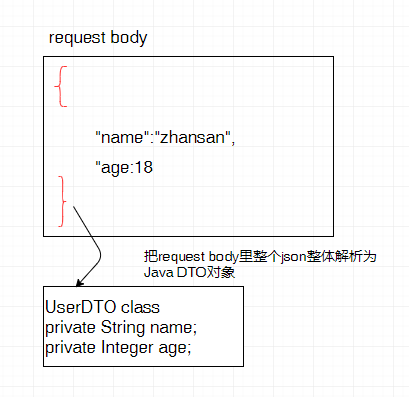
从上图可以看出,request body 中放置的是字符串形式的 JSON,而不是单单某个数据(它们最外层没有花括号,这样的请求过来必然报错)。
因此在@ApiImplicitParam中参数 paramType 要指定 body,把整个 request body 映射为 DTO,这样 Spring MVC 就自动解析并注入 DTO 参数了。
query string 接收数组
在查询字符串中是可以接收数组的,与 request body 中数组的差别是,query string 的数组是多个重复的值,如下:
// 多个重复id组成一个数组
?id=1&id=2&id=3
这种方式传递数组(也不单指数组)有个弊端——数据长度限制。
示例:
 1    @ApiOperation(value = "批量删除/删除", notes = " \n author: liuqichun 2021/3/28")
 2    @ApiImplicitParam(name = "ids", value = "搜索结果的id数组/列表", paramType = "query", dataType = "Long", allowMultiple = true)
 3    @DeleteMapping
 4    @PreAuthorize("@smpe.check()")
 5    public Result<Object> deleteBatch(@RequestParam Long[] ids) {
 6        if (ids == null) {
 7            throw new BadRequestException("【传入参数未ids为null】");
 8        }
 9	//TODO
10        return Result.success();
11    }
这里有一个注意点:要设置 allowMultiple = true,方便 Swagger 测试时输入参数,切勿将 paramType 设置为 body。
参考